


Installation information
Integrating Meljac Push Buttons & Switches with Lighting Control Systems
A considered interior demands considered controls.
Here is our guide to understanding our push button and toggle switch keypads and how they integrate with leading control systems such as Crestron, Lutron HomeWorks and Vantage.
Here is our guide to understanding our push button and toggle switch keypads and how they integrate with leading control systems such as Crestron, Lutron HomeWorks and Vantage.
WHY USE MELJAC? THE BENEFITS OF CUSTOM CONTROLS
Although each control system manufacturer offers their own native keypads, our clients and partners choose Meljac as the keypad controls for these reasons:
- Handcrafted Elegance: our hardware boasts exquisite craftsmanship and timeless designs that are brought to life by skilled artisans using traditional methods. The result of this process is apparent the moment you see and feel a Meljac product.
- Customized Controls: because every Meljac product is designed and crafted for each specific client, we offer an unmatched responsiveness to your aesthetic and control needs.
- Wide-ranging Integration: designed with compatibility in mind, Meljac push buttons seamlessly connect with leading lighting control systems, simplifying the setup process.
- Reliable Performance: our push buttons and toggles are mechanical switches made of robust physical parts that do not wear out as quickly as the delicate components found in electronic switches. This simplified design and durable construction ensures long-lasting operation.
- Maximum Controls / Minimal Space: the compact size of our push buttons and toggles allows you to efficiently combine many controls on a reduced form factor.
SWITCH DETAILS: MELJAC PUSH BUTTON & TOGGLE OPTIONS
Meljac offers several aesthetic variations of dry contact push buttons and toggle switches, UL-listed for low-voltage applications. (Note that our push buttons and toggle switches are not rated for use with main-voltage electrical lines in North America.)
We use momentary push buttons (normally-open) and toggle switches (2-position / return-to-center) in our keypad controls which allow for a short or sustained signal to be sent to the control system via the system manufacturer’s contact closure interface. This signal is then programmed to trigger a specific action such as turning lights on or off, setting a preset light level, or cycle dimming through a press and hold.
We use momentary push buttons (normally-open) and toggle switches (2-position / return-to-center) in our keypad controls which allow for a short or sustained signal to be sent to the control system via the system manufacturer’s contact closure interface. This signal is then programmed to trigger a specific action such as turning lights on or off, setting a preset light level, or cycle dimming through a press and hold.
CONTACT CLOSURE INTEGRATION WITH PANELIZED LIGHTING CONTROLS
Contact closure integration with a panelized lighting control system involves using switches or buttons that close or open a circuit, sending a signal to the control processor. Since these switches do not carry the load, they offer flexibility in design and placement, making them ideal for customized, user-friendly lighting solutions in sophisticated environments.
For most systems, the contact closure interface is designed to be small enough to fit inside the wallbox of the Meljac keypad. The interface then connects directly to the system’s communication wire, allowing the project to be wired in the same way it would for the system’s native keypads.
Alternatively, some projects may choose to remotely locate or use panel-based contact closure interfaces.
For most systems, the contact closure interface is designed to be small enough to fit inside the wallbox of the Meljac keypad. The interface then connects directly to the system’s communication wire, allowing the project to be wired in the same way it would for the system’s native keypads.
Alternatively, some projects may choose to remotely locate or use panel-based contact closure interfaces.

WIRING: MELJAC SWITCHES WITH CONTACT CLOSURE INTERFACES
For projects and systems using wallbox contact closure interfaces, the Meljac push button and toggles connect to color-coded input wire leads plus a shared common wire from the interface. There can be four to eight input leads depending on the system and manufacturer. Some manufacturers also offer 24V output wires which can power keypads LEDs for feedback or illumination.
Switch Details:
Switch Details:
- BP: Momentary Push Buttons = 1 contact closure
- INV: Momentary Toggles (returns-to-center) – 2 contact closures (up + down)
View Wiring Examples:
Push Button Wiring Example

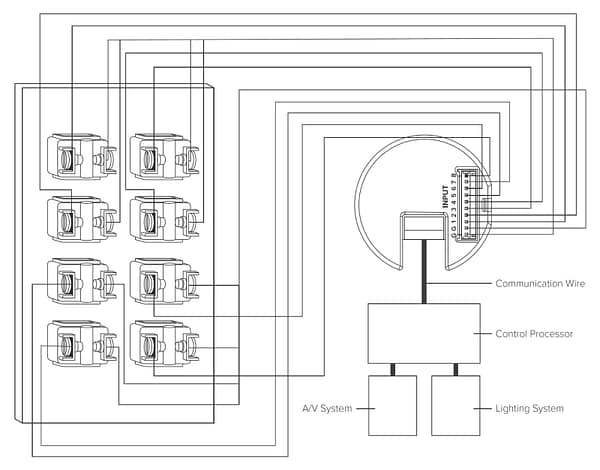
Toggle Wiring Example
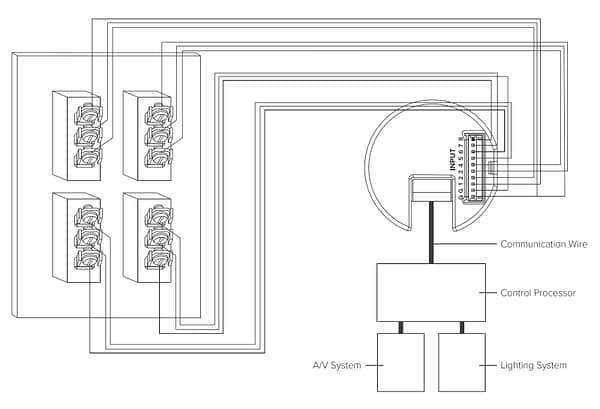
SYSTEMS COMPATIBLE WITH MELJAC KEYPAD CONTROLS
Meljac switches can work with any system that can accept a dry-contact input. Here are the systems that we most often work with and their respective integration hardware:
Crestron + Crestron Home
- Contact Closure Interface: C2N-UN-I8I0 (8 input leads + 8 output leads)
- Project Wiring: Crestron Communication Wire
- Backlighting/illumination: remote power supply and wiring required.
Note: Meljac also offers the Crestnet-connected keypad collection that directly connects into the Crestron system. View here.
LOXONE
- Contact Closure Interface: Nano DI Tree (8 input leads)
- Wiring: Cat6 or Cat7
- Backlighting/illumination: only possible with remote power supply and wiring.
LUTRON HOMEWORKS, MYROOM, ATHENA
- Contact Closure Interface: QSE-CE-WCI (8 input leads)
- Wiring: Lutron Communication Wire
- Backlighting/illumination: remote power supply and wiring required.
Vantage
- Contact Closure Interface: CIS10-DIN (10 input leads / Panel-Based)
- Wiring: Contact wire runs should be limited to 250 feet (76.2 meters) for each wire run using a minimum of 20AWG gauge wire. Stranded wire recommended.
- Backlighting/illumination: remote power supply and wiring required.
HOW MELJAC KEYPADS PROVIDE DIMMING, SCENE AND SHADE CONTROL
There are a variety of ways to customize control functionality in order to best suit the end-user’s needs and sensibilities when using Meljac keypads with a lighting control or home automation system.
Recommended dimming/control logics for lighting and shade loads, rooms or presets:
Recommended dimming/control logics for lighting and shade loads, rooms or presets:
Toggle – On/Off + Raise/Lower
provides on/off and directional dimming with one toggle.
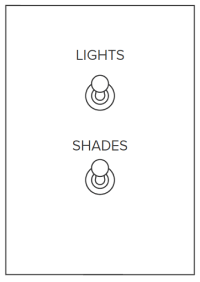
| Action | Function |
||
| Toggle Click Up | On or open |
||
| Toggle Hold Up | Raise |
||
| Toggle Raise Down | Lower |
||
| Toggle Click Down | Off or Close |
Note: due to the programming constraints of Lutron systems, the above toggle programming is only possible through significant conditional
programming that can only be handled by expert Lutron programmers. Projects wishing to achieve on/off + raise/lower when using Meljac toggle switches with Lutron systems are advised to discuss these details with their integrator.
programming that can only be handled by expert Lutron programmers. Projects wishing to achieve on/off + raise/lower when using Meljac toggle switches with Lutron systems are advised to discuss these details with their integrator.
Push Button – On/Off + Cycle Dim
provides on/off and cycle dimming with one push button.
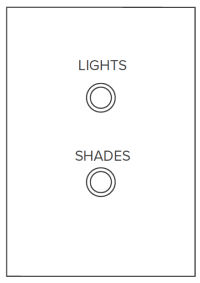
| Action | Function |
||
| Button Click One | On or open |
||
| Button Click Two | Off or close |
||
| Button Hold One | Cycle dim down or lower |
||
| Button Hold Two | Cycle dim up or raise |
Note: an additional button press while shades are in motion will stop
the shades.
the shades.
Push Button On/Off + Toggle Raise/Lower
separates the on/off control mechanism (push button) from the directional dimming mechanism (toggle).
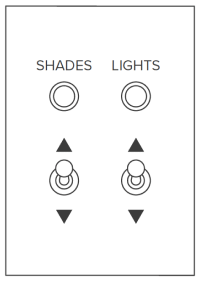
| Action | Function |
||
| Button Click One | On or open |
||
| Button Click Two | Off or close |
||
| Toggle Hold | Raise |
||
| Toggle Hold Down | Lower |
Push Buttons Master Raise/Lower
uses dedicated “raise” and “lower” push buttons in conjunction with other push buttons or toggles to turn on/off lighting, shades or presets. The “raise” and “lower” push buttons will always control the last lighting or shade that was triggered.
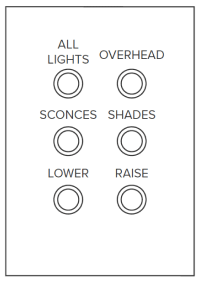
| Action | Function |
||
| “Raise” push button hold | Raises last-triggered light or shade |
||
| “Lower” push button hold | Lowers last-triggered light or shade |
Toggle Master Raise/Lower
uses a dedicated toggle for the raise/lower functions in conjunction with multiple push buttons or toggles to turn on/off lighting, shades or presets. The raise/lower toggle will always control the last lighting or shade that was triggered.
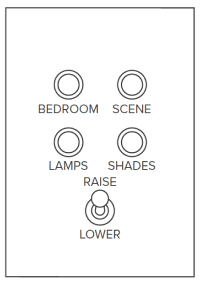
| Action | Function |
||
| “Raise” toggle hold up | Raises last-triggered light or shade |
||
| “Lower” toggle hold down | Lowers last-triggered light or shade |
BACK BOX REQUIREMENTS FOR MELJAC KEYPADS
When using Meljac keypads it is strongly recommended that you use Meljac back boxes.
Meljac back boxes have been designed with enough space to allow at least one contact closure interface to sit beneath our push buttons and toggles. For larger plates with more push buttons and toggles, especially those with custom combinations, you should always verify prior to purchasing.
For additional information regarding Meljac back boxes and plate sizes, please visit our back box page.
Meljac back boxes have been designed with enough space to allow at least one contact closure interface to sit beneath our push buttons and toggles. For larger plates with more push buttons and toggles, especially those with custom combinations, you should always verify prior to purchasing.
For additional information regarding Meljac back boxes and plate sizes, please visit our back box page.
Installation notes:
- Confirm that the appropriate back box is used for the corresponding Meljac plate size. See Plate Size and Back Box Guide for more information.
- Back box must be mounted at a level position. Plate will not allow for leveling adjustment.
- Back box should be installed flush or recessed up to 1” from the finished wall surface. They cannot be proud of the finished wall surface.
- Back box can be mounted in either a horizontal or vertical orientation, depending upon the plate specification on your order. Be sure to check the order details prior to installing the back box.
KEYPAD OPTIONS FOR BACKLIT ENGRAVINGS AND LED FEEDBACK
Meljac offers Classique and Damier collection keypads with either backlit engravings, illuminated buttons or small LED indicators. In all instances, these are individually wired LED lights that require external 24V power.
Specific system details:
Crestron + Crestron Home
The C2N-UN-I8I0 is able to power the illumination components with the 8 output leads, allowing for low-light illumination or feedback.
Lutron HomeWorks QSX
24V power supply and wiring is required to power the individual LEDs. This will allow for low-light illumination of backlit LEDs but is not recommended for feedback.
Vantage
Currently a remote 24V power supply and wiring is required to power the individual LEDs. In 2024 Vantage will be releasing a new wallbox contact closure interface that will include 8 output leads, allowing for simplified low-light illumination or feedback.
Please note: due to the additional components and technical complexity required for backlit engravings or LED indicators, we are not able to offer these premium add-ons for all projects. For projects that are using these features, there are additional constraints regarding plate sizes and engravings. It is imperative that projects interested in using these features contact Meljac North America prior to rough-in to ensure that the project needs can be met.
HOW TO PURCHASE MELJAC KEYPADS
Because Meljac keypads must be used as part of a third-party lighting control or home automation system they must be purchased through the
system integrator. This helps ensure a successful project delivery because the integrator is responsible for the programming, installation and
servicing of the control system that includes the Meljac keypad controls.
For project integrators who have not worked with Meljac products before, Meljac North America provides personalized project support. We
understand that working with a new product requires learning and education, and we will always strive to answer any questions, share best
practices and assist with project coordination.
The best projects come from successful preparation and teamwork in the design process. Meljac North America has extensive experience working with design, construction, and integration teams to ensure a smooth design coordination and project integration process.
Please contact Meljac North America with any design or integration questions.
system integrator. This helps ensure a successful project delivery because the integrator is responsible for the programming, installation and
servicing of the control system that includes the Meljac keypad controls.
For project integrators who have not worked with Meljac products before, Meljac North America provides personalized project support. We
understand that working with a new product requires learning and education, and we will always strive to answer any questions, share best
practices and assist with project coordination.
The best projects come from successful preparation and teamwork in the design process. Meljac North America has extensive experience working with design, construction, and integration teams to ensure a smooth design coordination and project integration process.
Please contact Meljac North America with any design or integration questions.